
Core · Video walkthrough
Return the final issued quantity and reconcile inventory balances
Complete an outstanding equipment return, inspect its ledger movement, and reconcile before-and-after location balances.
Before you begin
- Authorized Inventory access and a separate fictional training issuance.
- An existing partially returned issuance; this recording continues historical training data rather than creating a new issuance.
Chapters
Watch the walkthrough
Step 1
Find the remaining issued quantity
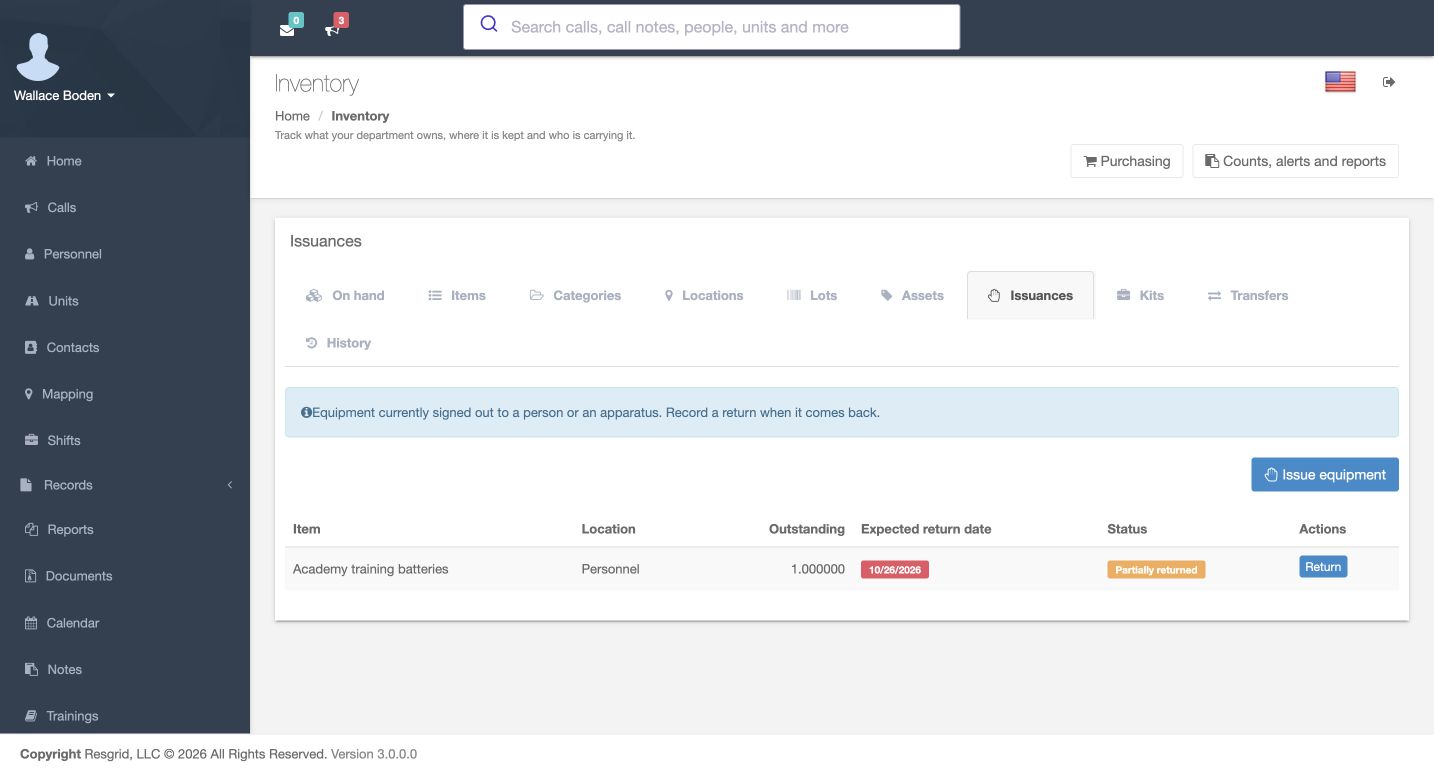
In Inventory, open Issuances and find the item that has come back. This example follows Academy training batteries after an earlier partial return. The row still shows one outstanding, the Personnel location, and Partially returned. Check the item, outstanding quantity and expected return date together. Select Return on that row to open its return form. This is a fictional software exercise in the training department.
Practice
Find the correct issuance and compare its outstanding quantity before opening Return.
Step 2
Read the return form before entering changes
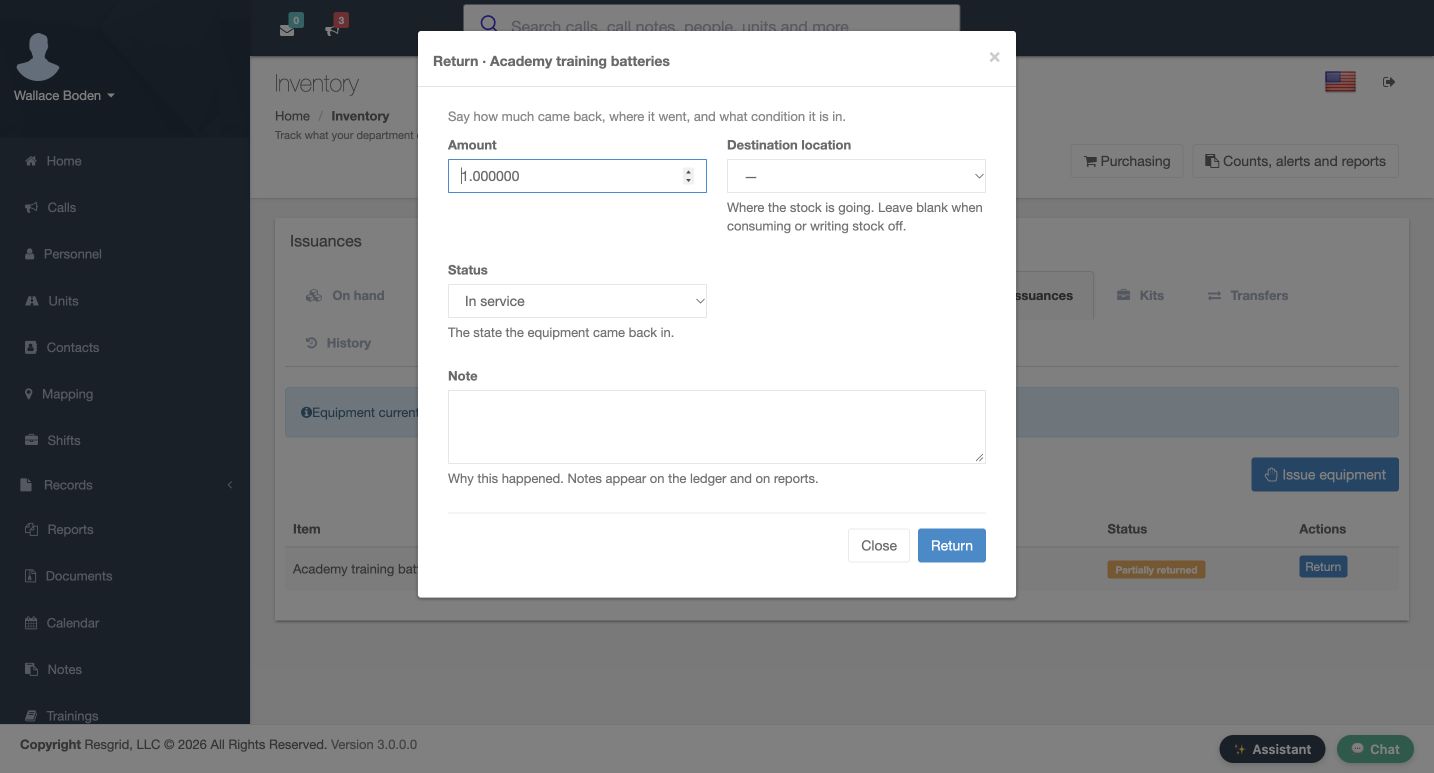
The Return dialog separates Amount, Destination location, Status and Note. Amount starts at the remaining quantity. The destination is initially blank, and the status is In service. The help beneath Destination location says to leave it blank when consuming or writing stock off. For this exercise the item is being returned to a stock location, so we will select a destination before submitting. Close exits this dialog without making the prepared return.
Practice
Identify the amount, destination, condition and note controls in the actual dialog.
Step 3
Choose where the returned stock goes
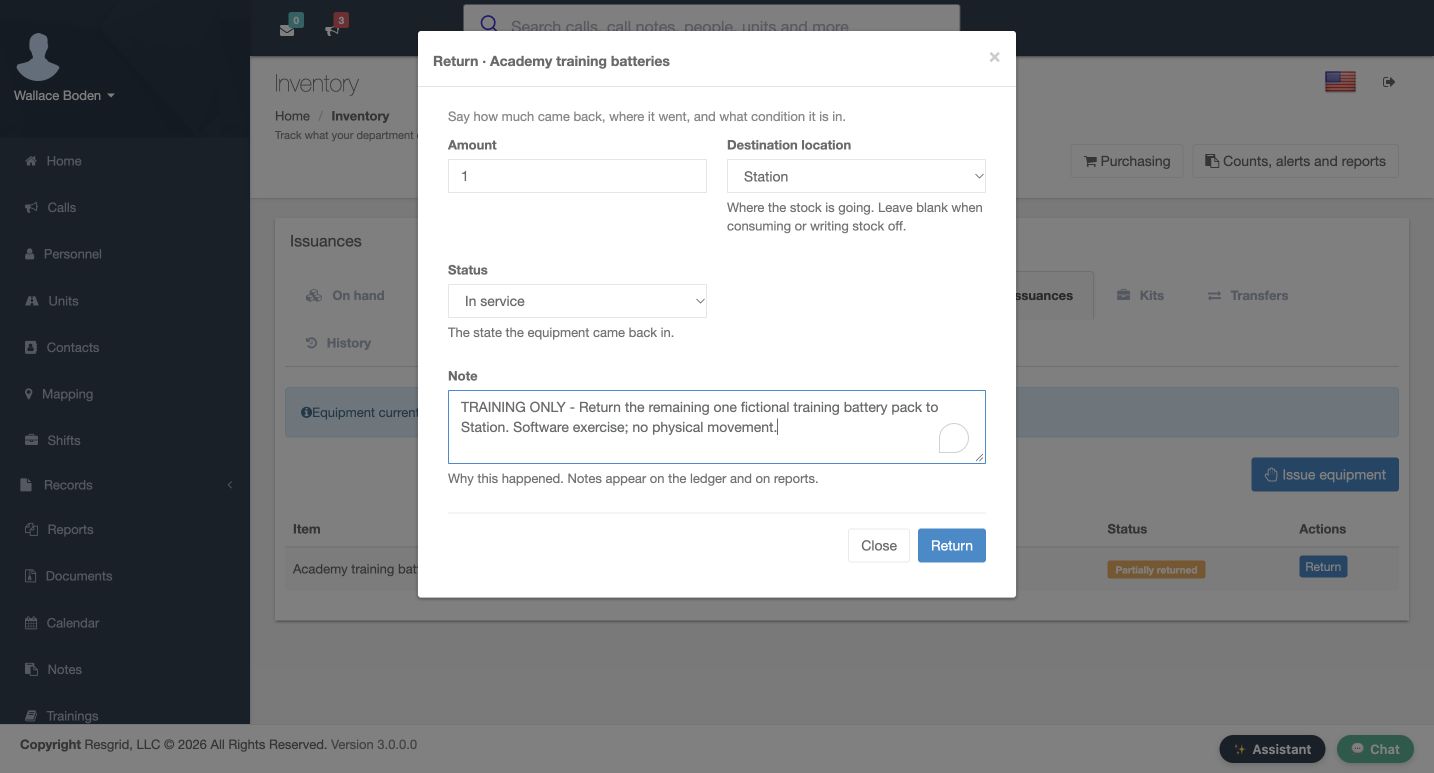
Set Amount to one and choose Station as the Destination location. Leave Status at In service for the intended return. Add a clear note explaining the movement. Here it says that the remaining fictional training battery pack is going back to Station, and that no physical movement is taking place. The quantity and destination are separate decisions: one tells Resgrid how much came back, and the other tells it where that stock is going.
Practice
Prepare the remaining quantity, the intended stock location and a useful explanation.
Step 4
Distinguish return conditions
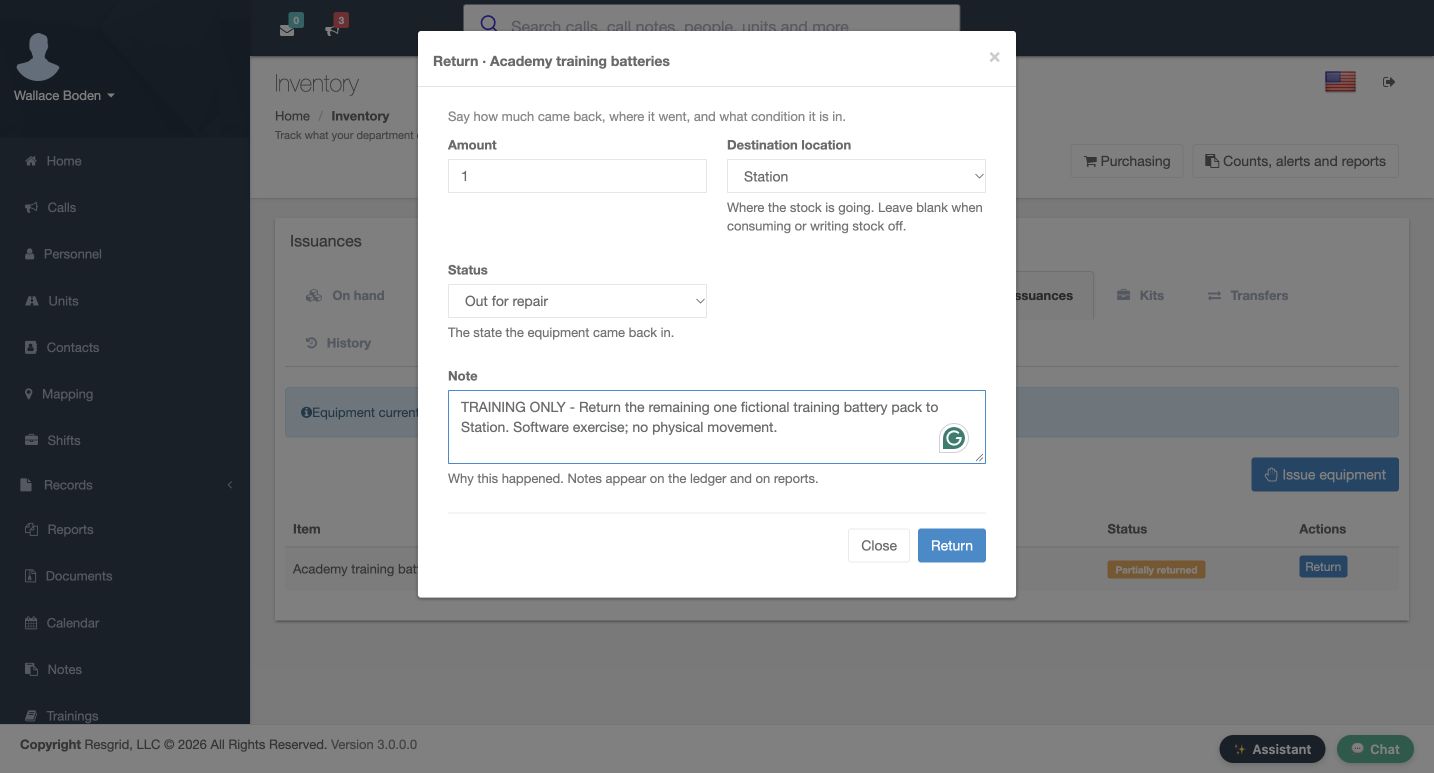
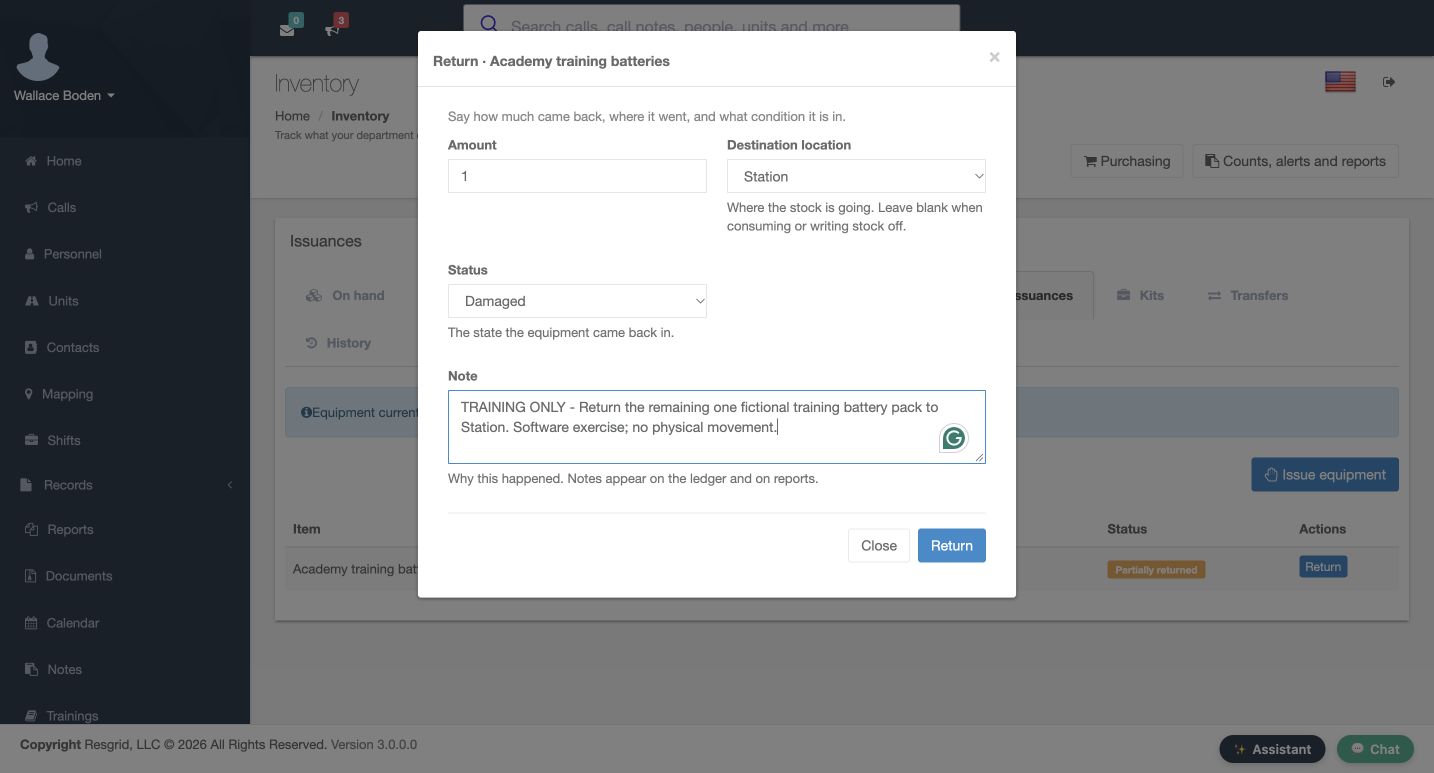
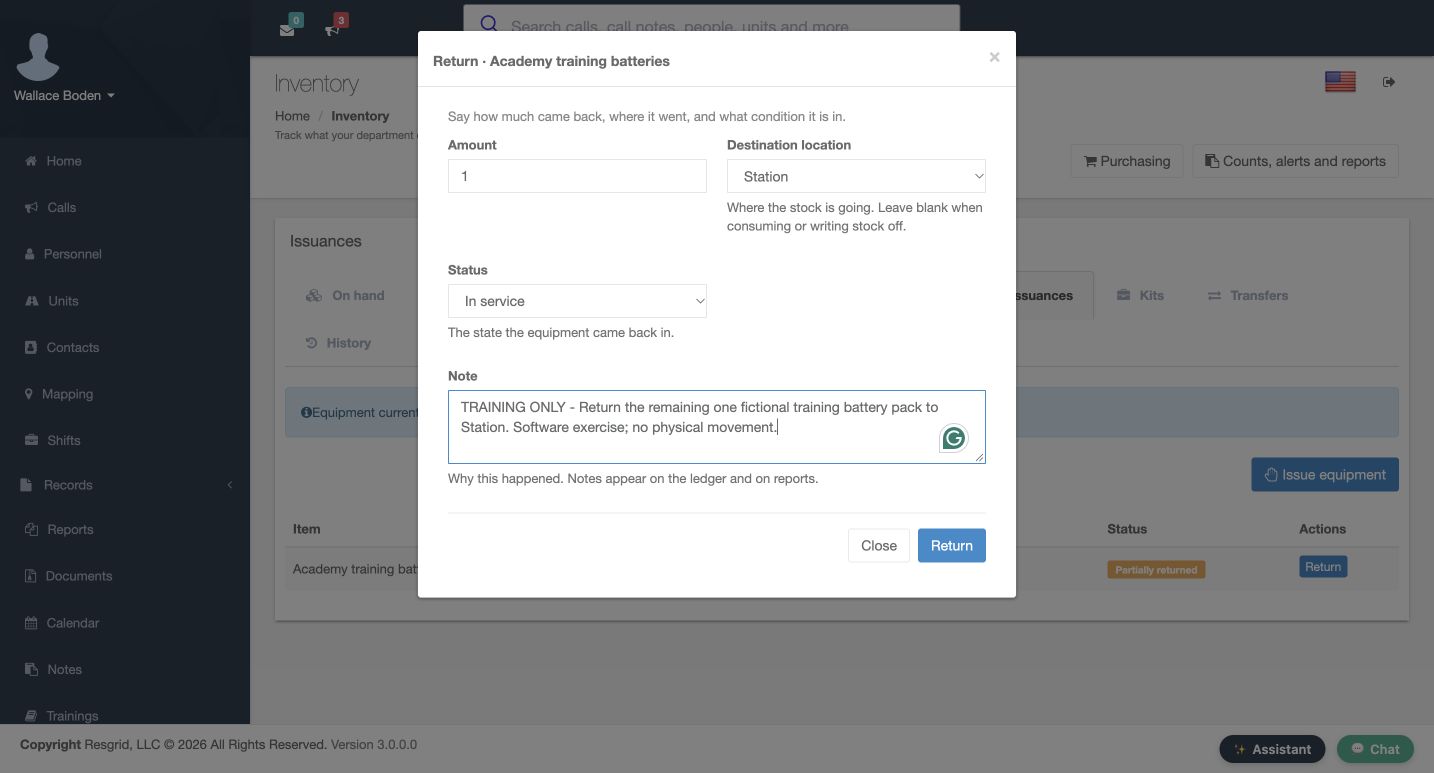
The Status control also offers Out for repair and Damaged. These screens show those choices selected in the form before saving. The help describes Status as the state the equipment came back in. Choose the condition that matches the actual return, following your department procedure. In this recording we inspect both alternatives and then restore In service; we do not post a damaged or repair return.
Practice
Recognize the condition choices without submitting a condition that does not match the item.
Step 5
Submit the final return and verify its result
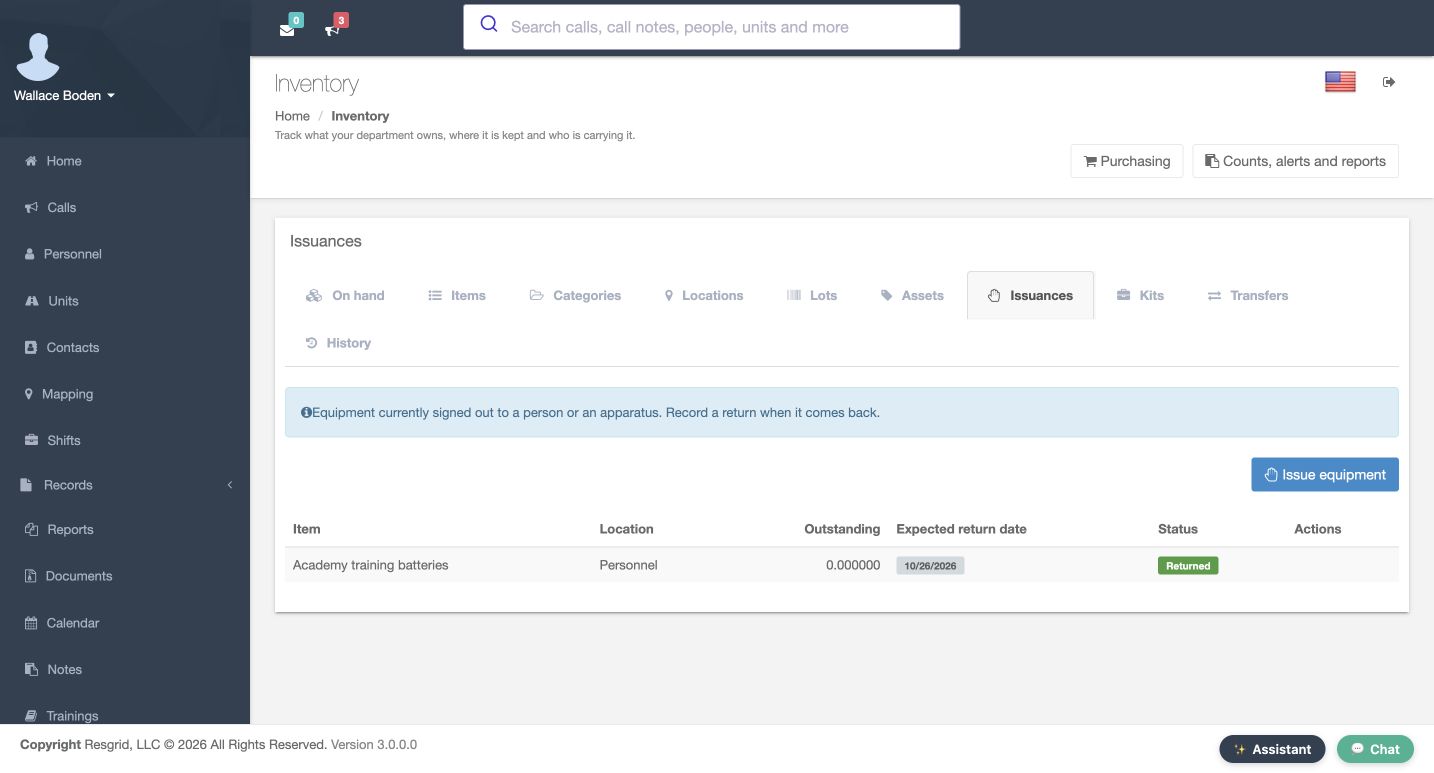
Before submitting, check the final form again: one item, Station, In service, and the training note. Select Return at the bottom of the dialog. The returned Issuances table now shows zero outstanding and a green Returned status on the same item row. Its Return action is gone. This saved result is the check that the last outstanding quantity has been cleared; a completed form alone would not establish that the return was stored.
Practice
Submit once, then verify zero outstanding and Returned on the matching issuance.
Step 6
Read the movement in History
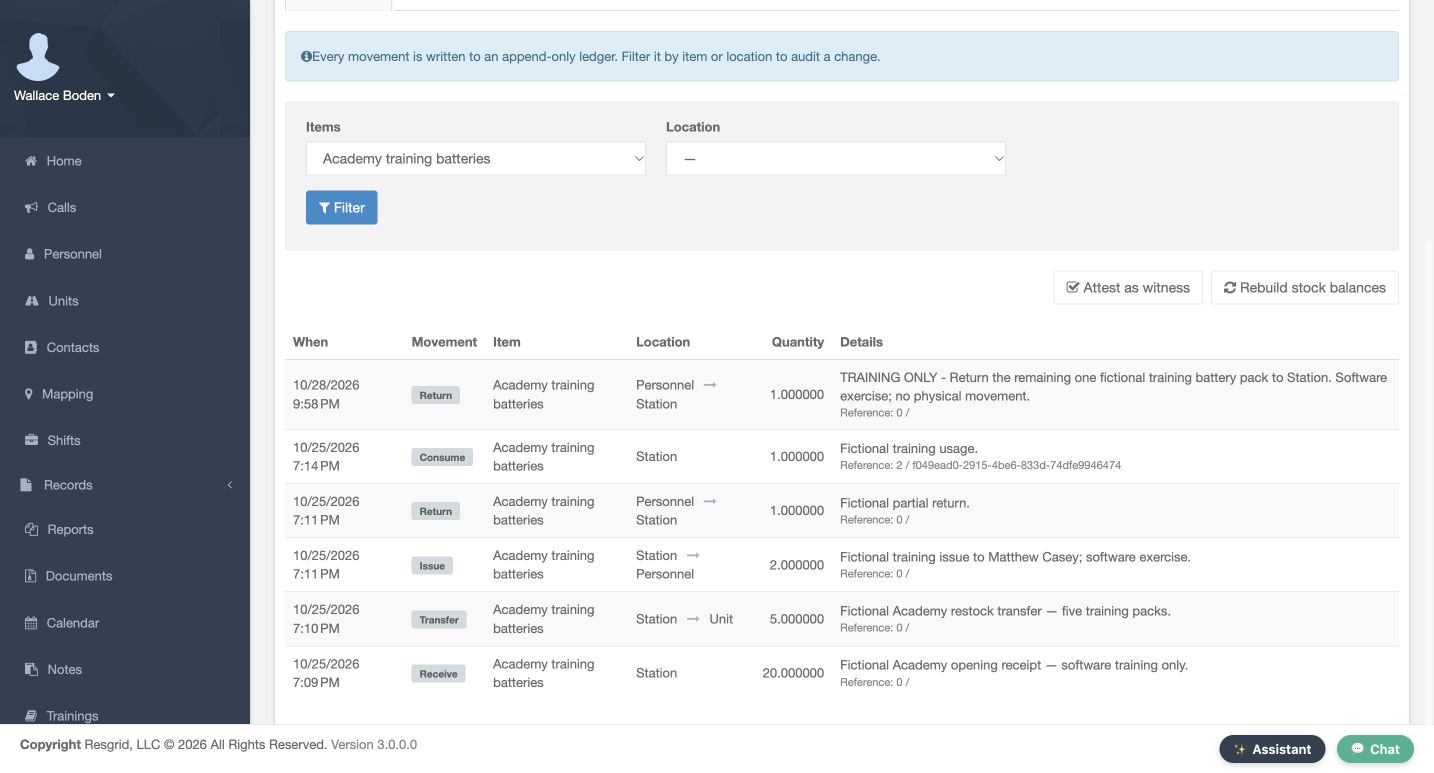
Open History to inspect the movement ledger. Filter to Academy training batteries. The newest row is a Return of one, moving from Personnel to Station, with the same explanatory note. The earlier partial return and the earlier Consume row remain visible as separate movements. Check the quantity, direction and note together when explaining a balance change. This review uses the ledger as shown; no witness attestation or stock-balance rebuild is performed.
Practice
Match the return to its ledger quantity, direction and note.
Step 7
Reconcile on-hand balances
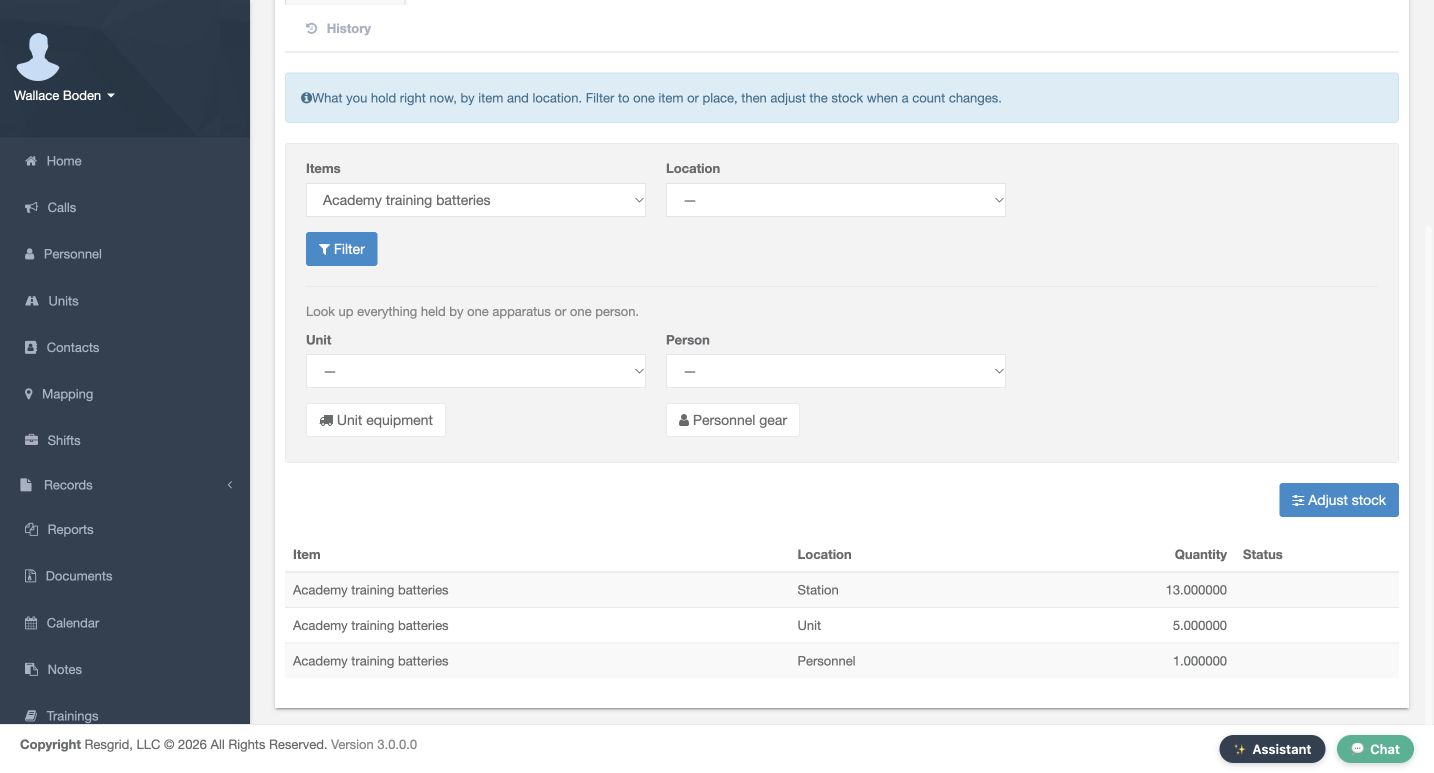
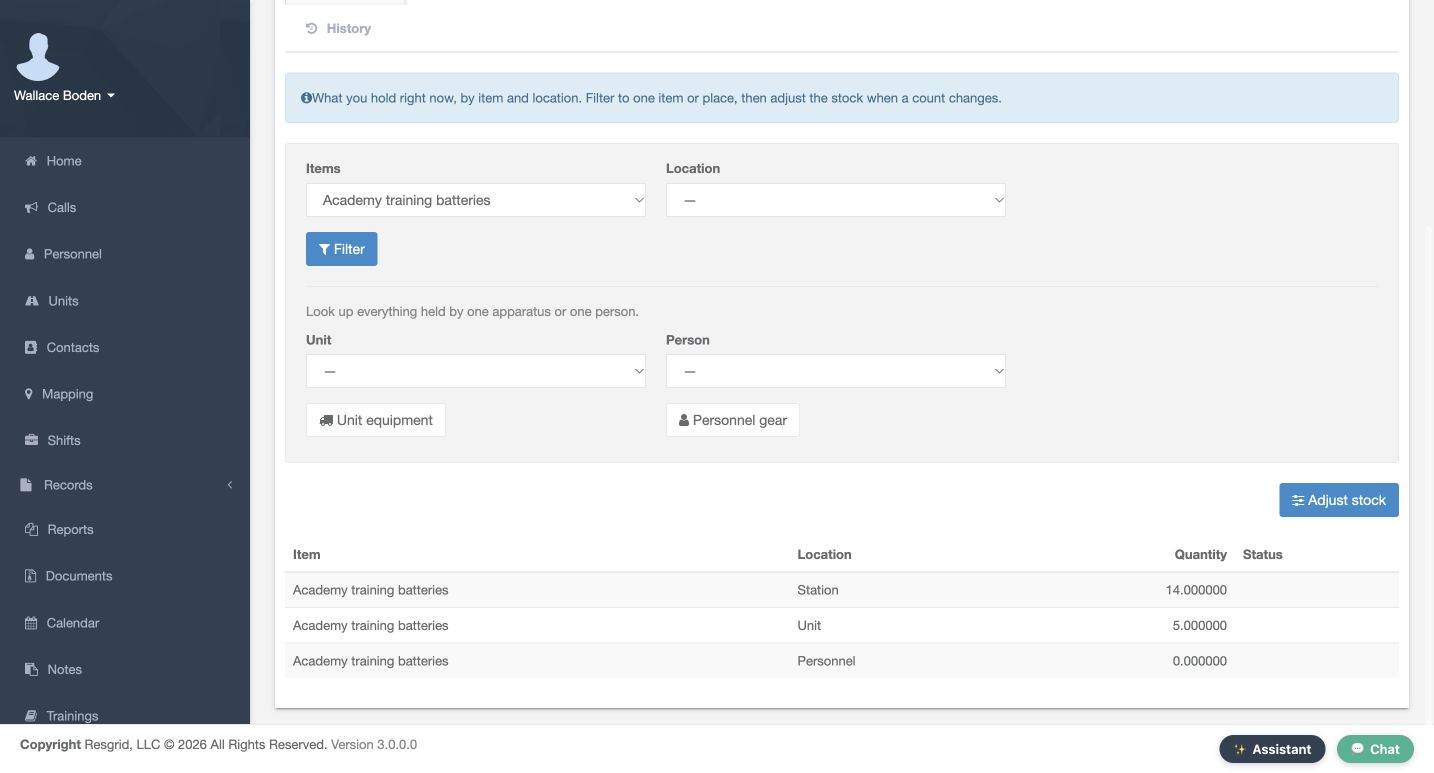
Return to On hand and apply the item filter. Before this return, the recorded balances were thirteen at Station, five at Unit and one at Personnel. After the return, they are fourteen at Station, five at Unit and zero at Personnel. The total stays nineteen. Returning issued stock changes where that quantity is held; it does not reverse the separate earlier consumption or restore the original receipt of twenty.
Practice
Compare the before and after locations, and reconcile the unchanged total.
Step 8
Use the same review across department types
Use the same quantity, location and condition checks for other department equipment. A search-and-rescue team can track returned radio batteries, a security company can track issued equipment, and a wildland contractor can reconcile field supplies. Community paramedicine and mental health response teams, industrial emergency teams, and fire and E M S departments can use the same recorded return process. Agree who records returns, and verify both the issuance and the location balances after each exercise.
Practice
Choose an example relevant to your department and define who verifies its return.
Examples for your department
- Fire / EMS
- Close the remaining issuance and verify the corresponding ledger movement.
- Community response
- Check returned equipment for community paramedicine and mental health teams.
- Search and rescue
- Reconcile a final radio-battery return to a base stock location.
- Security
- Review remaining issued equipment and its return condition.
- Wildland
- Trace returned field supplies without reversing earlier consumption.
- Industrial
- Review equipment condition and location balances.
Transcript
Download transcriptRead the complete transcript
Return the final issued quantity and reconcile inventory balances
Audience: Inventory administrators, Equipment officers, Department supervisors

Find the remaining issued quantity
In Inventory, open Issuances and find the item that has come back. This example follows Academy training batteries after an earlier partial return. The row still shows one outstanding, the Personnel location, and Partially returned. Check the item, outstanding quantity and expected return date together. Select Return on that row to open its return form. This is a fictional software exercise in the training department.
Practice: Find the correct issuance and compare its outstanding quantity before opening Return.

Read the return form before entering changes
The Return dialog separates Amount, Destination location, Status and Note. Amount starts at the remaining quantity. The destination is initially blank, and the status is In service. The help beneath Destination location says to leave it blank when consuming or writing stock off. For this exercise the item is being returned to a stock location, so we will select a destination before submitting. Close exits this dialog without making the prepared return.
Practice: Identify the amount, destination, condition and note controls in the actual dialog.

Choose where the returned stock goes
Set Amount to one and choose Station as the Destination location. Leave Status at In service for the intended return. Add a clear note explaining the movement. Here it says that the remaining fictional training battery pack is going back to Station, and that no physical movement is taking place. The quantity and destination are separate decisions: one tells Resgrid how much came back, and the other tells it where that stock is going.
Practice: Prepare the remaining quantity, the intended stock location and a useful explanation.

Distinguish return conditions
The Status control also offers Out for repair and Damaged. These screens show those choices selected in the form before saving. The help describes Status as the state the equipment came back in. Choose the condition that matches the actual return, following your department procedure. In this recording we inspect both alternatives and then restore In service; we do not post a damaged or repair return.
Practice: Recognize the condition choices without submitting a condition that does not match the item.

Submit the final return and verify its result
Before submitting, check the final form again: one item, Station, In service, and the training note. Select Return at the bottom of the dialog. The returned Issuances table now shows zero outstanding and a green Returned status on the same item row. Its Return action is gone. This saved result is the check that the last outstanding quantity has been cleared; a completed form alone would not establish that the return was stored.
Practice: Submit once, then verify zero outstanding and Returned on the matching issuance.

Read the movement in History
Open History to inspect the movement ledger. Filter to Academy training batteries. The newest row is a Return of one, moving from Personnel to Station, with the same explanatory note. The earlier partial return and the earlier Consume row remain visible as separate movements. Check the quantity, direction and note together when explaining a balance change. This review uses the ledger as shown; no witness attestation or stock-balance rebuild is performed.
Practice: Match the return to its ledger quantity, direction and note.

Reconcile on-hand balances
Return to On hand and apply the item filter. Before this return, the recorded balances were thirteen at Station, five at Unit and one at Personnel. After the return, they are fourteen at Station, five at Unit and zero at Personnel. The total stays nineteen. Returning issued stock changes where that quantity is held; it does not reverse the separate earlier consumption or restore the original receipt of twenty.
Practice: Compare the before and after locations, and reconcile the unchanged total.

Use the same review across department types
Use the same quantity, location and condition checks for other department equipment. A search-and-rescue team can track returned radio batteries, a security company can track issued equipment, and a wildland contractor can reconcile field supplies. Community paramedicine and mental health response teams, industrial emergency teams, and fire and E M S departments can use the same recorded return process. Agree who records returns, and verify both the issuance and the location balances after each exercise.
Practice: Choose an example relevant to your department and define who verifies its return.

Examples for your department
Fire / EMS: Close the remaining issuance and verify the corresponding ledger movement.
Community response: Check returned equipment for community paramedicine and mental health teams.
Search and rescue: Reconcile a final radio-battery return to a base stock location.
Security: Review remaining issued equipment and its return condition.
Wildland: Trace returned field supplies without reversing earlier consumption.
Industrial: Review equipment condition and location balances.